The page-2 trap: why your best keywords never reach page 1
Open your Search Console right now and sort your queries by impressions. Somewhere in the top twenty there's a keyword you'd love to rank for — and you already do. Position 9. Or 11. Or 14. Google shows your page to hundreds of people a month for that exact search, and almost none of them ever see it, because almost nobody scrolls that far.
That's the page-2 trap. It's not a ranking problem in the usual sense — you've already done the hard part. Google decided your page is relevant. It just hasn't decided your page is better than seven other pages, and the difference between "relevant" and "top five" is the difference between traffic and nothing.
We watch this on our own site. Bilgoh.com is a young domain. In one recent 30-day window we had 284 impressions and 61 clicks — a 21.5% click rate, which sounds great until you realize it's carried almost entirely by queries where we sit in the top three. The queries stuck at position 8+ contributed impressions and close to zero clicks. Same site, same content quality. Position is everything.
The cliff nobody budgets for
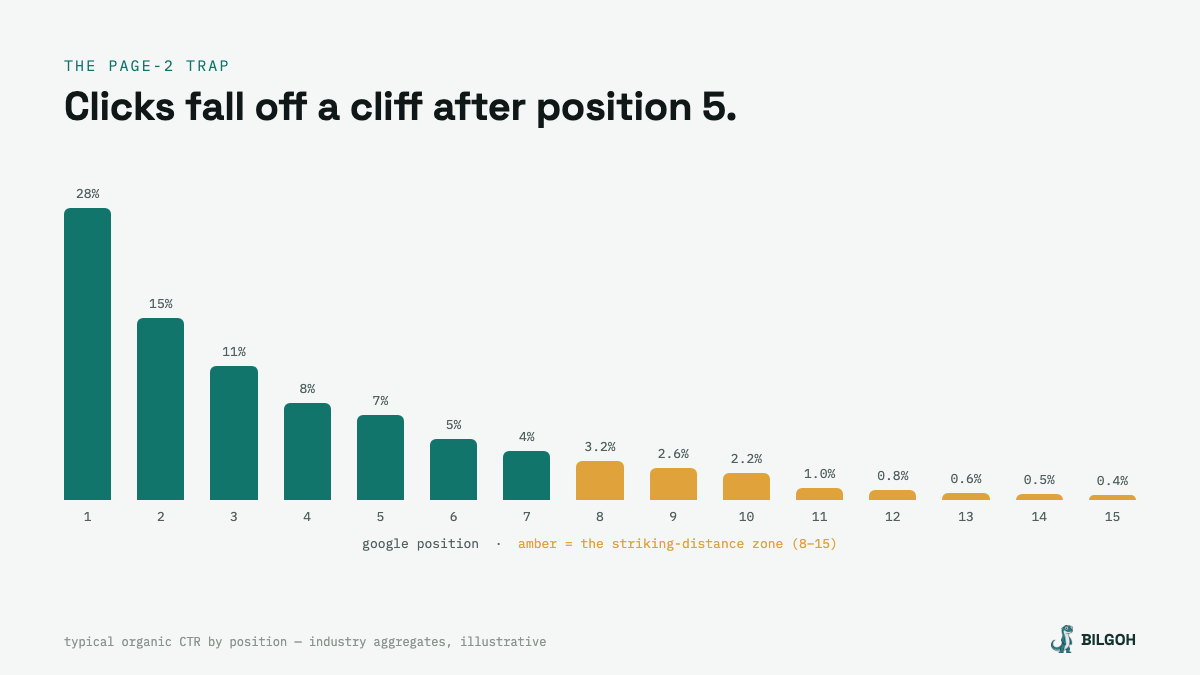
The chart above shows the shape of it. Industry CTR studies disagree on exact numbers, but they all agree on the curve: position 1 takes somewhere around a quarter to a third of all clicks, position 5 takes single digits, and by position 11 — the top of page 2 — you're under one percent. The drop from position 8 to position 15 isn't a slope. It's a wall.
Here's why this matters more than your next new blog post: a keyword at position 12 with 900 monthly impressions is worth more than most keywords you haven't targeted yet. The demand is proven. Google has already matched you to it. Moving it from 12 to 5 might triple, or 10x, the clicks — and moving an existing page is usually a week of small edits, not a month of new content.
SEOs call these striking-distance keywords: close enough to hit, not yet hitting. Positions 8 through 15 is the usual definition. Some people stretch it to 20; we don't, because past 15 you're often looking at a page that ranks by accident rather than intent.
Why teams miss it (including us, for a while)
Because dashboards report averages. Your average position across the whole site might read "9.4," which feels like a grade, not a to-do list. The interesting data — which specific queries, on which specific pages, are sitting just below the fold of page 1 — takes filtering that most people never set up. It's four clicks in Search Console and nobody does it monthly.
The second reason is more human: new content feels like progress and maintenance doesn't. Writing a fresh post is visible work. Adding two internal links to an eight-month-old page looks like nothing in a standup. But the eight-month-old page has age, links, and a proven query match. The fresh post starts from zero on all three.
The play, step by step
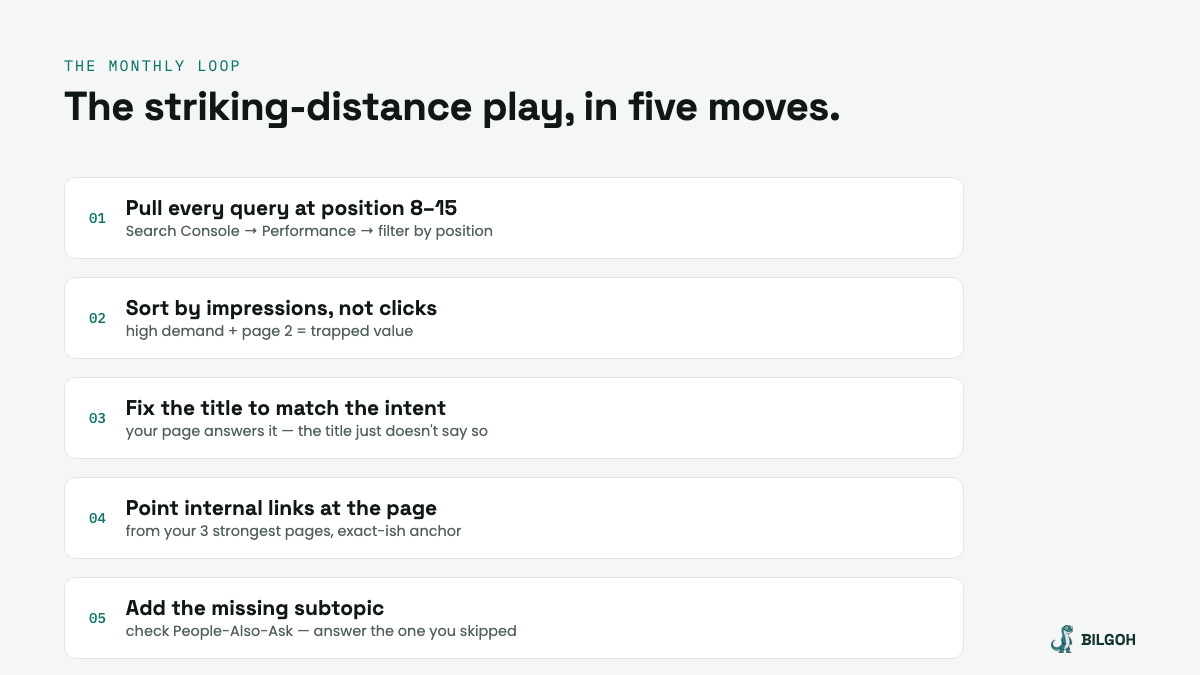
1. Pull every query at position 8–15. Search Console → Performance → filter position greater than 7.5, less than 15.5, date range last 28 days. Export it. This list is your actual SEO backlog.
2. Sort by impressions, not clicks. Clicks tell you what's already working. Impressions tell you where the demand is. A query with 1,200 impressions and 4 clicks is trapped value; a query with 40 impressions isn't worth the edit.
3. Fix the title first. Nine times out of ten the page half-answers the query but the title doesn't say so. If people search "seo audit checklist for saas" and your title is "Our Approach to Site Health," you lose the click even when you rank. Rewrite the title to mirror the query's words and intent. This alone moves CTR, and CTR movement at position 8 tends to move position.
4. Point internal links at the page. Find your three strongest pages — homepage, top blog post, whatever holds authority — and link from them to the trapped page with anchor text close to the target query. Internal links are the most under-used ranking lever because they're free and boring.
5. Add the one missing subtopic. Search the query yourself, look at the People-Also-Ask boxes, and find the question your page skips. Add a section that answers it properly. You're not padding word count — you're closing the specific gap between "relevant" and "complete."
Then wait two to three weeks and re-pull the report. Some queries move fast. Some don't move at all — those usually have a page-type mismatch (Google wants a comparison table and you wrote an essay), which is a different fix for a different post.
This exact loop is built into Bilgoh's Web Presence view. It connects to your Search Console, pulls the striking-distance queries automatically every time you re-analyze, ranks them by trapped impressions, and hands the fix — retitle, interlink, extend — to its SEO crew as a drafted deliverable you approve. The report nobody remembers to run becomes the report that runs itself. Here's how the whole loop works →
Make it a habit, not a project
The striking-distance play compounds because the list refreshes itself. Every piece of content you publish eventually drifts into the 8–15 zone for queries you never planned. Fixing them promotes the page; the promotion earns links; the links lift the next batch. Run it monthly and it quietly becomes your highest-ROI SEO hour.
One warning from experience: don't fix everything at once. Pick the top five queries by impressions, make the edits, and leave the rest alone so you can actually tell what worked. SEO gives you few clean experiments — this is one of them. Don't waste it.
Your page-2 list already exists.
Connect Search Console and Bilgoh will pull your striking-distance queries, rank the trapped value, and draft the fixes — you just approve.
Start free →